NinjaTrader 8 Indicator
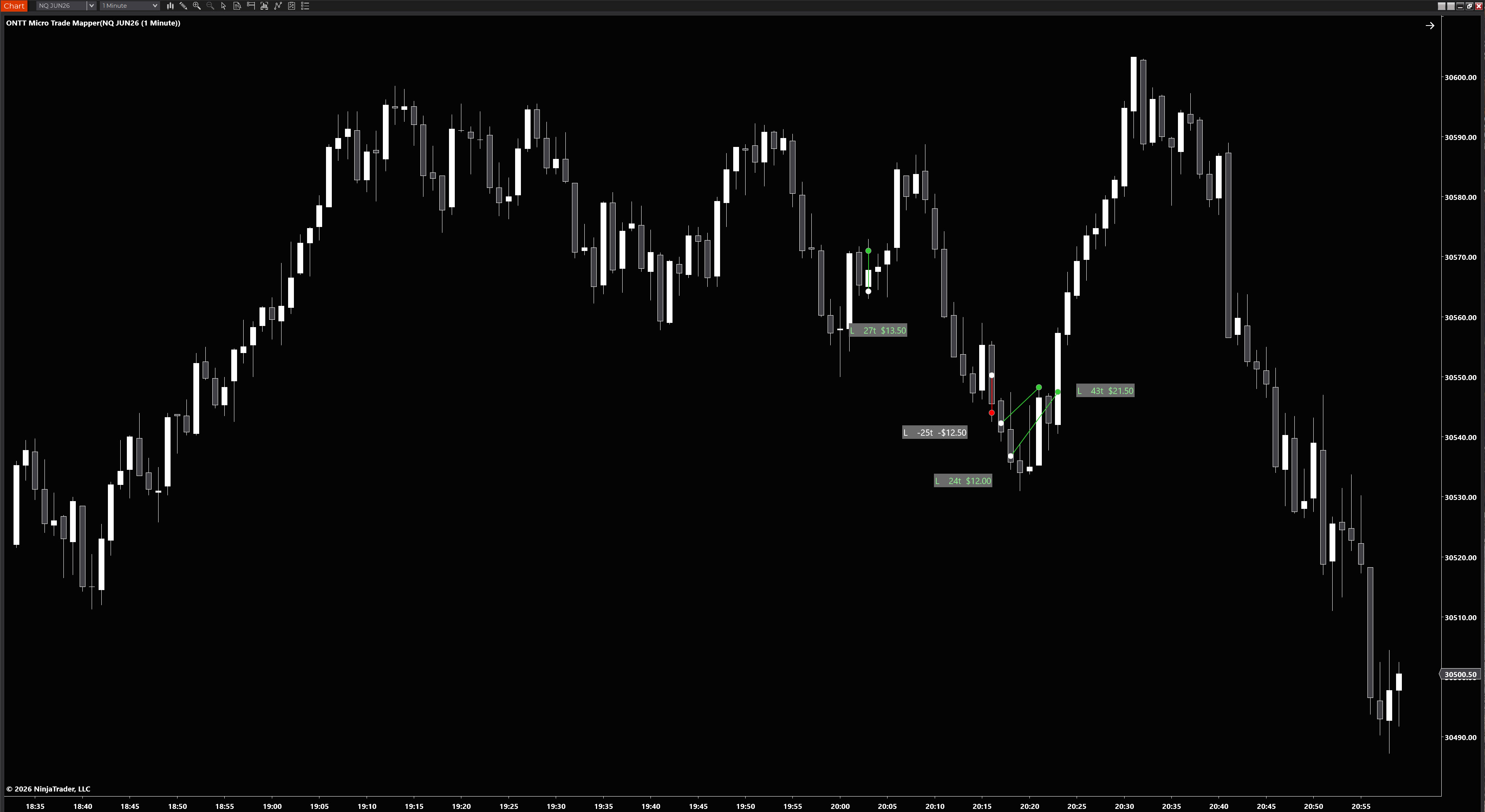
You trade the micros. You chart on the mini. Now your exact execution prices appear on the mini chart in real time — no manual markup, no guesswork, no wasted time between trades.
// The problem it solves
Prop firms have made micro contracts the go-to instrument. But the mini chart is where the reliable structure lives — VWAP, key levels, the clean price action. The problem is your micro execution prices don't match the mini exactly. Until now.
Why the mini chart matters for micro traders
Micro contracts often show small price deviations from their mini equivalents — especially on VWAP and key structural levels. Trading off a micro chart means those levels are slightly off. The solution most traders use is to chart on the mini and execute on the micro. Micro Trade Mapper Pro is built specifically for that workflow — it takes your exact MNQ or MES execution prices and plots them directly onto the NQ or ES chart in real time.
Pulls your live micro execution data and maps every entry and exit onto the mini chart the moment a trade closes. No delay, no manual input. Your actual fill prices, plotted where you need to see them.
Enter your account name to pull trades from that account only. Leave it blank and every account's trades come through. Clean separation between sim and live, or between different prop firm accounts.
Set backfill days to 1 for today's trades only — clean chart, no clutter. Set it higher to import weeks of historical executions. Review your entries against structure as far back as you need.
Every trade label can be grabbed and repositioned directly on the chart. Busy session? Drag the labels clear of price action. The built-in collision detector stacks them automatically when they'd otherwise overlap — so they're always clean and easy to grab.
Choose exactly what each label displays — direction (L/S), trade number, ticks, P&L in dollars, and duration. Show only what's relevant to your review process. Each field is independently toggled in the properties panel.
Green lines and labels for winners, red for losers — fully configurable colours. Spot patterns in your execution quality at a glance without reading every label. Your edge (or lack of it) becomes immediately visual.
// Full control
Nothing locked away. The full properties panel is laid out in clearly labelled groups — find what you need without hunting.
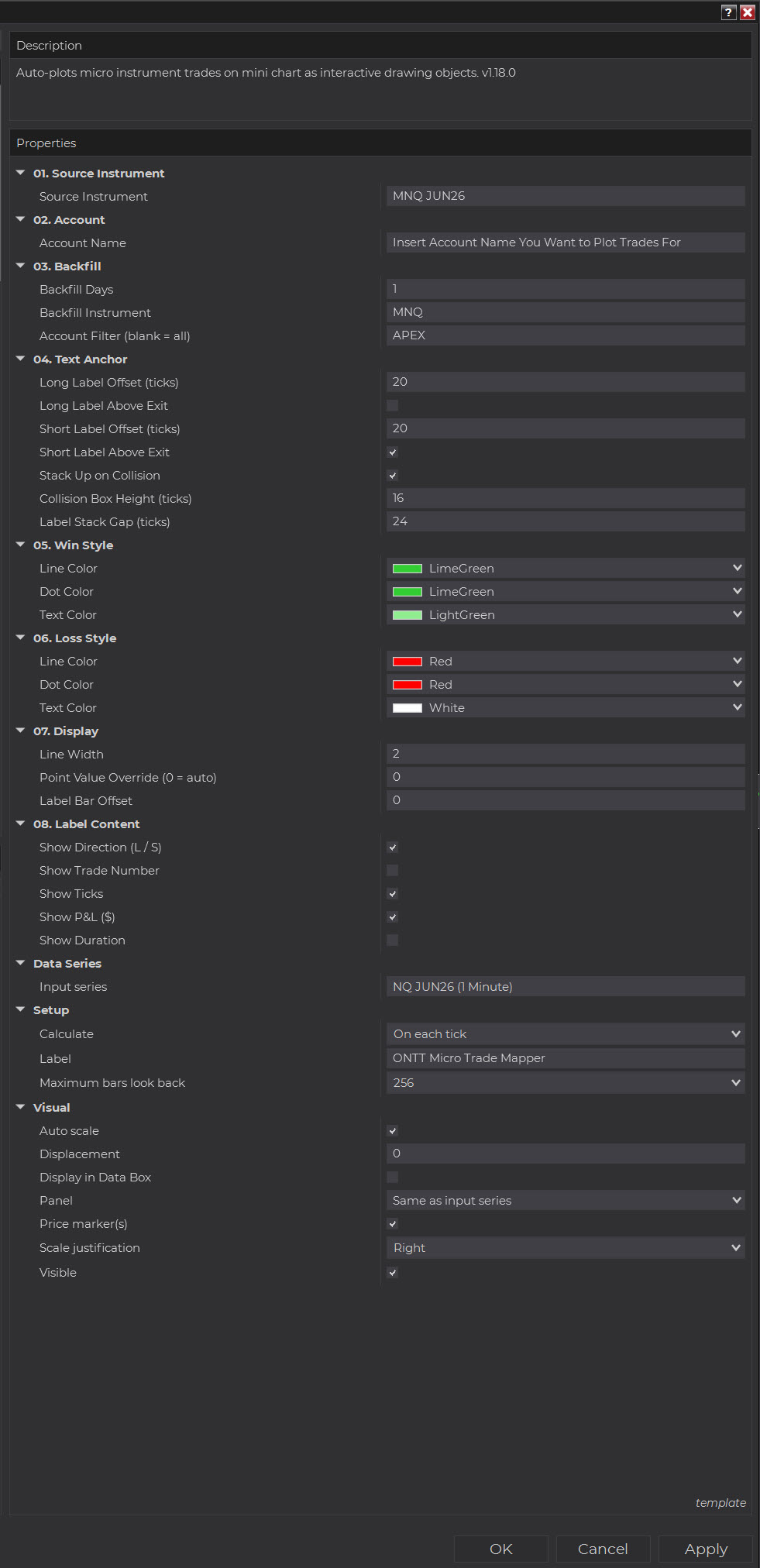
Point the indicator at your micro instrument and enter your account name to pull trades from that account only. Leave Account Name blank and it pulls from all connected accounts simultaneously — clean separation between sim, live, and multiple prop firm accounts.
Win and loss styles are configured independently — line colour, dot colour, and text colour for each. Every label field is independently toggled so you show only what's relevant to your review process.
To import previous sessions, export your trade history from NinjaTrader as a CSV and load it via the indicator. Once the indicator is applied to your chart, all trades going forward are stored and plotted automatically — no further action needed.
// Stop wasting time on admin
Every minute you spend manually marking up your journal is a minute you're not preparing for the next trade. For scalpers running multiple trades a session, that admin adds up fast.
Reduce friction, reduce tilt, improve performance
Manual journaling after a losing trade is one of the most friction-heavy tasks in a trader's workflow. You're already frustrated — and now you have to carefully mark up the exact bar you got stopped out on. That friction breeds tilt. When your trades are already on the chart, the review process is immediate and frictionless — which means you actually do it, and do it clearly.
// Also included
Beyond the core mapping engine, Micro Trade Mapper Pro ships with a set of tools built to keep your chart clean, your labels manageable, and your review process fast.
When multiple trades occur in a tight price range, labels would normally stack on top of each other and become unreadable. The built-in collision detector automatically offsets them so every label stays clean, distinct, and easy to grab — with configurable collision box height, stack gap, and above/below exit placement.
Every trade label is independently movable — click and drag to reposition. Busy session with trades stacked in a range? Move them into clear space. Labels stay exactly where you put them, with an offset control for default placement, and it works across every chart timeframe.
Enable Market Replay Mode in the indicator settings to see live trade execution dots plotted the instant they happened — not after the fact. Import a CSV log from a fellow trader or mentor and watch their entries and exits appear in replay, second by second, alongside the price action, for a closer look at how someone else actually manages a trade in real time. This feature is included now, but is currently in alpha testing — functionality may change as it's refined.
// Setup in minutes
Standard NinjaTrader import. No complicated configuration — add it to your mini chart, set your source instrument and account, and it starts pulling data immediately.
Complete checkout via Stripe. Secure card processing. No account needed.
Tools → Import → NinjaScript Add-On in NinjaTrader. Select the ZIP. Done in under a minute.
Add to your mini chart. Set Source Instrument (e.g. MNQ) and Account Name. To load previous sessions, import your NinjaTrader trade history CSV via the indicator.
Execute on your micros as normal. Every trade appears on your mini chart automatically.
// Pricing
// Micro Trade Mapper Pro
One-time payment. No subscription. No renewal.
COMING SOON
This indicator is in final preparation. Check back shortly.
Mini contracts are still the go-to for structure and key levels. Micro contracts are what you execute on — smaller risk, prop firm friendly, same markets. This indicator is the missing link between the two.
Stop spending 15 minutes after every session manually marking up your entries and exits. Stop trying to remember exactly where you got in. The indicator does it in real time, on the chart you're already watching.
Questions before buying? [email protected]
// Common questions
If your question isn't here, email the address at the bottom.