Initial Balance Pro£9.99 Composite Volume Profile Pro£14.99 Micro Trade Mapper Pro£14.99 Scalpers Ruler Pro£4.99
COMING SOON

NinjaTrader 8 Indicator

Composite Volume Profile Pro.

Maps where volume has been accepted and rejected across a user-defined lookback period. Structural reference built for the higher timeframe trader, kept deliberately lightweight.

Get the Indicator
£14.99 One-time. No subscription.
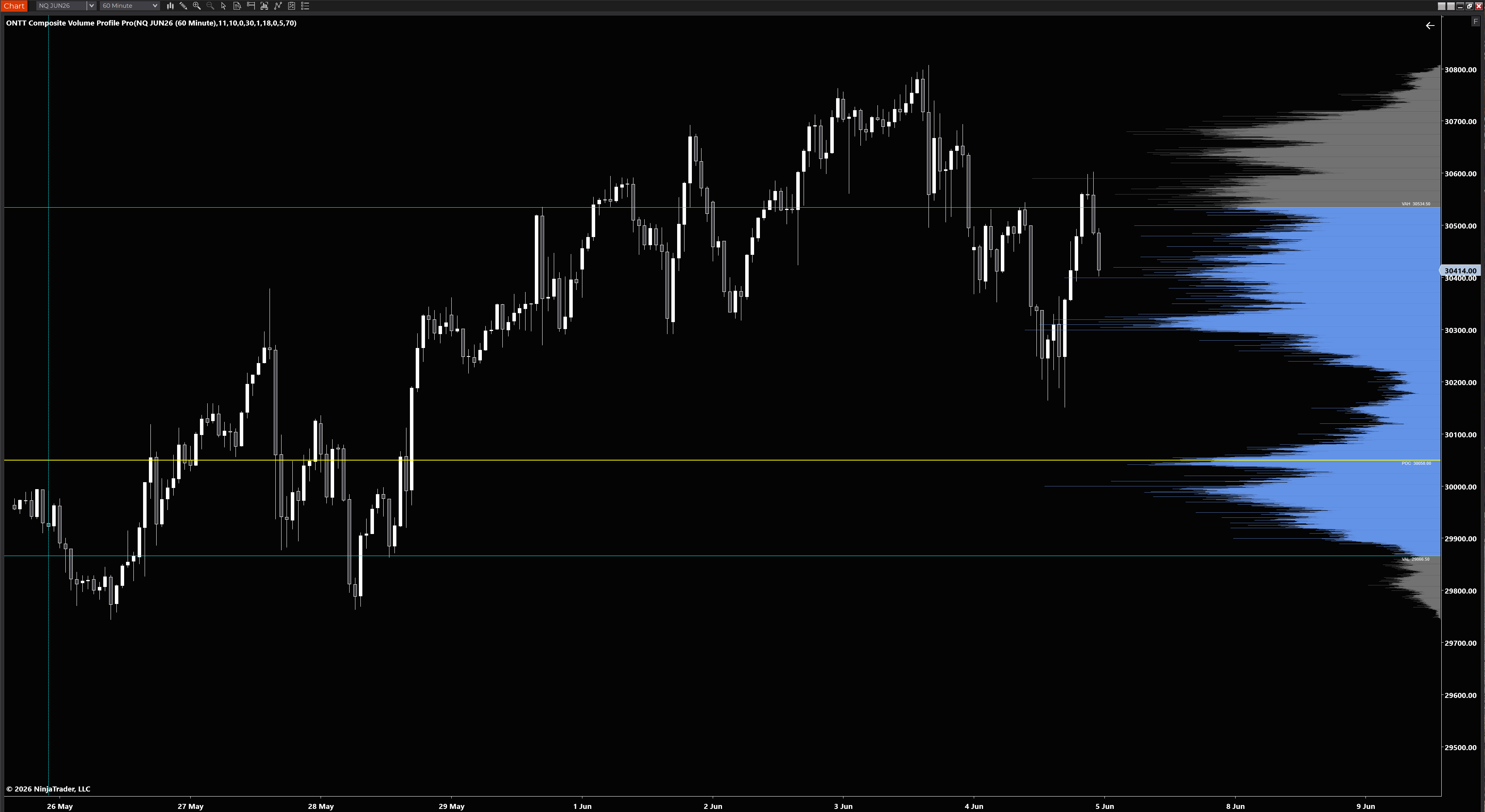
NQ JUN26 — 60 Minute — Composite Volume Profile Pro (10 Day Lookback)
Composite Volume Profile Pro on NQ 60-minute chart
Platform NT8 NinjaTrader 8 only
Price £14.99 One-time, instant delivery
Timeframe 60m+ Designed for higher timeframes

// What it does

Structural volume context,
on any lookback.

Builds a composite volume profile across however many sessions you define — showing you exactly where the market has spent the most time and volume.

Point of Control

The POC marks the price level with the highest volume traded across the entire lookback window. The market's most accepted price.

Value Area High and Low

VAH and VAL define the range where the majority of volume was traded. Configurable value area percentage — default 70%.

Timed Update

On a 60-minute chart, bar close only updates once an hour. Enable Timed Update and the profile refreshes every X minutes during live trading — giving you a more current view without switching timeframe.

High Precision Mode

Loads a tick data series alongside your chart for the most granular possible volume distribution. Ideal where bar-based approximation is not sufficient.

Configurable Row Size

Row size in ticks — set to 1 for maximum granularity, or increase for a lighter profile on instruments with many price levels such as NQ.

Full Customisation

Inside and outside value area colours, POC colour and line width, VAH and VAL styling, session start line, label positions and font size — all configurable.

Low Volume Nodes — high probability reaction zones

Where the profile shows thin bars — areas where price moved through quickly with little volume — these Low Volume Nodes act as magnets and rejection points. Price tends to pass through them rapidly or reverse sharply at them. The composite profile makes these zones clearly visible across multiple sessions, giving you structural reference points that are not visible on a standard intraday profile.

// Profile position

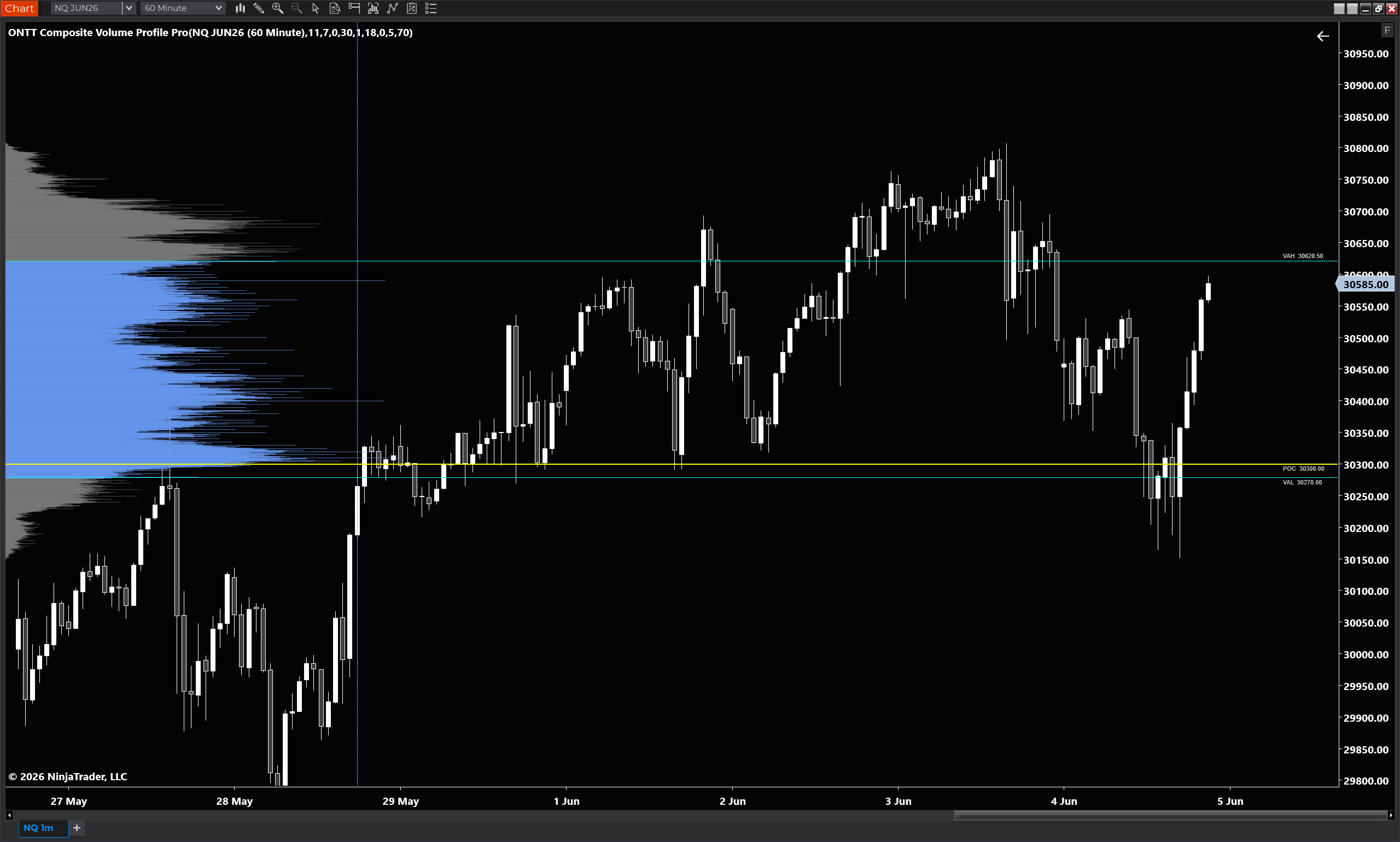
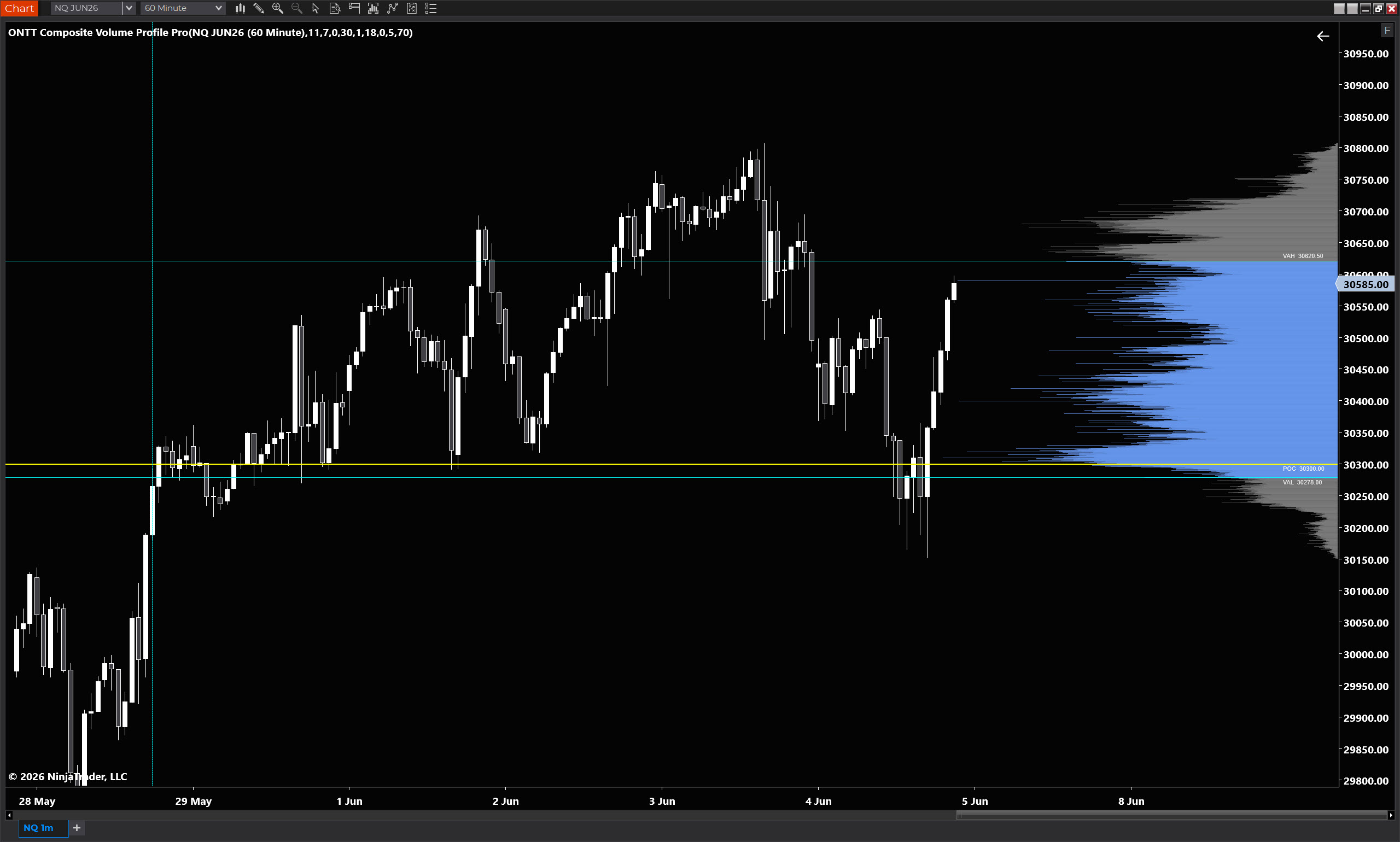
Left side or right side,
your choice.

The histogram can be flipped to either side of the chart. Toggle it in the properties panel — one click, no reconfiguration needed.
// Properties

Every setting exposed.

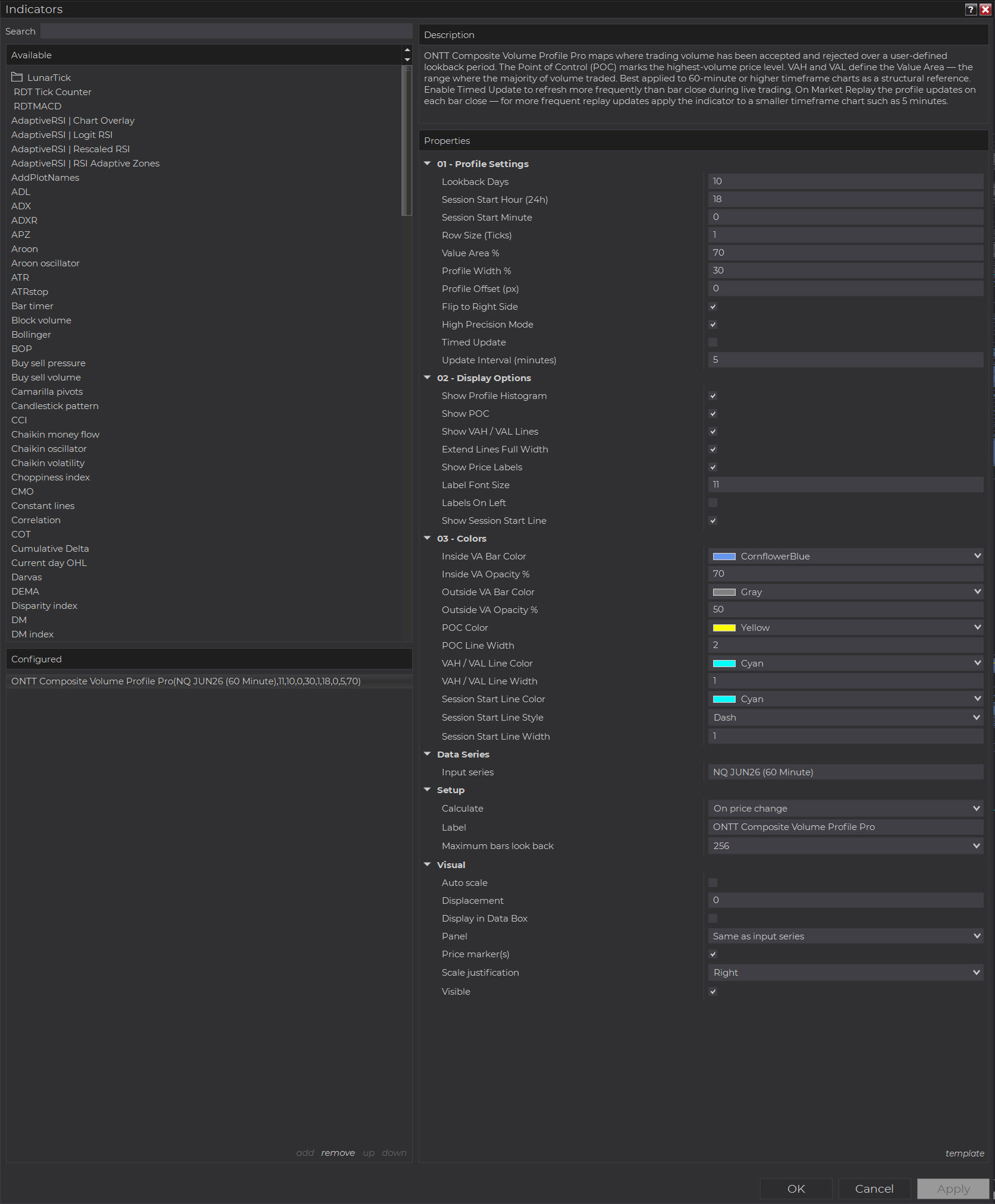
Nothing is locked away. The full properties panel is shown below — click the image to zoom.
Full properties panel
Composite Volume Profile Pro properties panel

Three organised setting groups.

Profile Settings, Display Options, and Colors — grouped cleanly so you find what you need without scrolling through an unstructured list.

  • Lookback days — 1 to 252 sessions
  • Session start time — hour and minute, 24h format
  • Row size in ticks — granularity control
  • Value Area % — default 70, fully adjustable
  • Profile width and offset in pixels
  • Flip profile to left or right side
  • Timed update with configurable interval
  • High Precision Mode toggle
  • Show or hide POC, VAH, VAL, histogram, and session line independently
  • Extend lines full chart width or profile width only
  • Labels left or right edge, font size adjustable
  • Per-element colour and opacity control

// Pricing

Fair price.
Instant delivery.

// Composite Volume Profile Pro

£14.99

One-time payment. No subscription. No renewal.

  • Compiled DLL — source code protected
  • POC, VAH, VAL with full histogram
  • Timed update for live trading on higher timeframes
  • High Precision Mode with tick data series
  • Full property customisation
  • Works on all instruments and timeframes
  • Email delivery within minutes

COMING SOON

This indicator is in final preparation. Check back shortly.

Built for higher timeframe traders.

Most volume profile tools are built around intraday use. This one is built specifically for the structural view — composite volume across multiple sessions giving you the true picture of where the market has accepted and rejected price.

Lightweight by design. The timed update option means you are not waiting for a 60-minute bar to close to get a current profile view during live trading.

Questions before buying? [email protected]

// Common questions

FAQ.

60-minute or higher is recommended. The composite profile is a structural tool — it is designed to show you where volume has been distributed across multiple sessions, not to replace an intraday profile on lower timeframes.
Standard mode distributes bar volume evenly across the bar's price range — accurate for most purposes. High Precision Mode loads a tick data series and assigns volume at the exact trade price, giving a more accurate distribution. It uses more system resources and requires the indicator to be re-added after toggling.
When enabled, the profile rebuilds every X minutes during live trading regardless of bar closes. On a 60-minute chart this means you can have a current profile view every 2 or 5 minutes rather than waiting a full hour. Timed Update has no effect during Market Replay — on replay the profile always updates on bar close.
An email is sent automatically to the address used at checkout within a few minutes of payment. It contains a download link for the ZIP file. Check your spam folder if it does not arrive promptly.
Yes — any instrument supported by NinjaTrader 8 with volume data. Futures, stocks, and forex all work. The session start time is configurable so you can align the composite window to the correct session open for your instrument.
SCROLL TO ZOOM  ·  DRAG TO PAN  ·  DOUBLE-CLICK TO RESET